---
title: Technical SEO Audit Framework for SaaS Products (Complete Guide)
description: "Step-by-step technical SEO audit guide for SaaS teams: diagnose indexation, performance, and UX issues that suppress signups and revenue growth."
image: https://www.seo-growup.com/hubfs/Technical%20SEO%20Audit%20for%20SaaS%20Growth.webp
---
[Skip to main content](https://www.seo-growup.com/blog/technical-seo-audit-for-saas#main)
[ ](https://www.seo-growup.com)
- [Show submenu for Services Services](https://www.seo-growup.com/b2b-saas-seo-services)
- [LLM SEO](https://www.seo-growup.com/llm-seo-agency-for-b2b-saas-companies)
- [Show submenu for SEO Audit SEO Audit](https://www.seo-growup.com/seo-audit-for-b2b-saas-companies)
- [LLM Visibility Audit](https://www.seo-growup.com/ai-search-audit-services)
- [Content Audit](https://www.seo-growup.com/b2b-saas-content-audit-services)
- [Copywriting Audit](https://www.seo-growup.com/website-copywriting-audit-service)
- [SEO Consultancy](https://www.seo-growup.com/seo-consultancy-for-b2b-saas-companies)
- [Fractional SEO](https://www.seo-growup.com/fractional-seo-consultancy-for-b2b-saas-companies)
- [Content Marketing](https://www.seo-growup.com/b2b-saas-content-marketing-agency)
- [Web Copywriting](https://www.seo-growup.com/b2b-saas-copywriting-agency)
- [SEO Link Building](https://www.seo-growup.com/b2b-saas-link-building-agency)
- [Pricing](https://www.seo-growup.com/pricing)
- Show submenu for Clients Clients
- Show submenu for By Stage By Stage
- [SEO for Startups](https://www.seo-growup.com/b2b-saas-startup-seo-agency)
- [SEO for Scale-Ups](https://www.seo-growup.com/seo-agency-for-b2b-saas-scaleups)
- [SEO for Enterprises](https://www.seo-growup.com/enterprise-b2b-saas-seo-agency)
- Show submenu for By Sector By Sector
- [ConTech](https://www.seo-growup.com/construction-tech-seo-agency)
- [EdTech](https://www.seo-growup.com/seo-agency-for-ed-tech)
- [FinTech](https://www.seo-growup.com/fintech-seo-agency)
- [HR Tech](https://www.seo-growup.com/seo-agency-for-hr-tech)
- Show submenu for Company Company
- [Why GrowUp](https://www.seo-growup.com/why-growup)
- [Success Stories](https://www.seo-growup.com/success-stories)
- Show submenu for Resources Resources
- Show submenu for Hub Hub
- [Vetting SEO Partners](https://www.seo-growup.com/choosing-a-b2b-saas-seo-partner)
- [Audit Engagements](https://www.seo-growup.com/b2b-saas-seo-audit-guide)
- [Blog](https://www.seo-growup.com/growup-blog)
- [eBooks & Templates](https://www.seo-growup.com/ebooks-and-templates)
- [GTM Prompt Library](https://www.seo-growup.com/gtm-prompt-library)
- [Past Newsletters](https://www.seo-growup.com/newsletter)
- [Glossary](https://www.seo-growup.com/glossary)
Open main navigation
Close main navigation
- Show submenu for Services Services
- Services
- [Services](https://www.seo-growup.com/b2b-saas-seo-services)
- [LLM SEO](https://www.seo-growup.com/llm-seo-agency-for-b2b-saas-companies)
- Show submenu for SEO Audit SEO Audit
- SEO Audit
- [SEO Audit](https://www.seo-growup.com/seo-audit-for-b2b-saas-companies)
- [LLM Visibility Audit](https://www.seo-growup.com/ai-search-audit-services)
- [Content Audit](https://www.seo-growup.com/b2b-saas-content-audit-services)
- [Copywriting Audit](https://www.seo-growup.com/website-copywriting-audit-service)
- [SEO Consultancy](https://www.seo-growup.com/seo-consultancy-for-b2b-saas-companies)
- [Fractional SEO](https://www.seo-growup.com/fractional-seo-consultancy-for-b2b-saas-companies)
- [Content Marketing](https://www.seo-growup.com/b2b-saas-content-marketing-agency)
- [Web Copywriting](https://www.seo-growup.com/b2b-saas-copywriting-agency)
- [SEO Link Building](https://www.seo-growup.com/b2b-saas-link-building-agency)
- [Pricing](https://www.seo-growup.com/pricing)
- Show submenu for Clients Clients
- Clients
- Show submenu for By Stage By Stage
- By Stage
- [SEO for Startups](https://www.seo-growup.com/b2b-saas-startup-seo-agency)
- [SEO for Scale-Ups](https://www.seo-growup.com/seo-agency-for-b2b-saas-scaleups)
- [SEO for Enterprises](https://www.seo-growup.com/enterprise-b2b-saas-seo-agency)
- Show submenu for By Sector By Sector
- By Sector
- [ConTech](https://www.seo-growup.com/construction-tech-seo-agency)
- [EdTech](https://www.seo-growup.com/seo-agency-for-ed-tech)
- [FinTech](https://www.seo-growup.com/fintech-seo-agency)
- [HR Tech](https://www.seo-growup.com/seo-agency-for-hr-tech)
- Show submenu for Company Company
- Company
- [Why GrowUp](https://www.seo-growup.com/why-growup)
- [Success Stories](https://www.seo-growup.com/success-stories)
- Show submenu for Resources Resources
- Resources
- Show submenu for Hub Hub
- Hub
- [Vetting SEO Partners](https://www.seo-growup.com/choosing-a-b2b-saas-seo-partner)
- [Audit Engagements](https://www.seo-growup.com/b2b-saas-seo-audit-guide)
- [Blog](https://www.seo-growup.com/growup-blog)
- [eBooks & Templates](https://www.seo-growup.com/ebooks-and-templates)
- [GTM Prompt Library](https://www.seo-growup.com/gtm-prompt-library)
- [Past Newsletters](https://www.seo-growup.com/newsletter)
- [Glossary](https://www.seo-growup.com/glossary)
- [Get In Touch](https://www.seo-growup.com/get-in-touch)
[Get In Touch](https://www.seo-growup.com/get-in-touch)
# Technical SEO Audit Framework for SaaS Products (Complete Guide)
by [Muiz Thomas](https://www.seo-growup.com/blog/author/muiz-thomas)
Feb 13, 2026
**For a SaaS founder or CMO, technical SEO is often viewed through the lens of maintenance, a set of backend fixes needed to keep a website running. In practice, that mindset creates a strategic blind spot.**
When a SaaS platform carries technical debt, revenue gets diluted. High-intent search queries don’t reach your product pages because search engines can’t properly access, render, or prioritise those pages.
This guide provides a framework for prioritising technical [SEO audits based on business impact](https://www.seo-growup.com/seo-audit-for-b2b-saas-companies), conversion potential, and developer resource allocation.
## How to Prioritise Technical SEO Issues in B2B SaaS
Running technical [SEO audits for SaaS](https://www.seo-growup.com/b2b-saas-seo-audit-guide) comes down to one core principle: if Google can’t crawl or index a page, that page has zero commercial value.
The **prioritisation model** below reflects that reality: we fix visibility risk first, then conversion efficiency, then authority and optimisation layers.
| Tier | Key Issues | Business Impact |
| --- | --- | --- |
| **P0: Access and Visibility (Critical)** | JavaScript rendering failures, robots.txt blocks, “noindex” tags on revenue pages, and server errors (5xx) | Immediate loss of organic visibility and zero return on content investment. If a page cannot be crawled or indexed, its commercial value is zero. |
| **P1: Conversion and Performance (High)** | Core Web Vitals (LCP, CLS), mobile-first indexing discrepancies, and slow server response times (TTFB) | Traffic arrives but bounces. Users see your page but don't convert to trials or demos. |
| **P2: Authority and Structure (Medium)** | Site architecture, internal linking, and XML sitemap errors | Diluted rankings for high-intent keywords and slower discovery of new product features. These issues affect how search engines understand the relationship between your pages. |
| **P3: Optimisation and CTR (Low)** | Schema markup, metadata optimisation | Lower click-through rates (CTR) and minor ranking fluctuations. These are incremental improvements that enhance the user’s experience in search results. |
Use this framework to run your audit. The checklist below breaks down every check by tier, start at P0 and work down.
[**⮞ Download Tech SEO Audit Checklist**](https://docs.google.com/spreadsheets/d/1XHRJs_sIEtJyzmr1SDEEhcsW1zwOxMtU/edit?usp=sharing&ouid=105747650752063488714&rtpof=true&sd=true)
## Running a Technical SEO Audit Across Your SaaS Website (Step-by-Step)
Here’s how to execute each tier. We’ve broken the audit into five phases, prioritised by business impact.
### Phase 1: Crawlability and Indexation
The first priority in SaaS SEO is ensuring search engines can reliably access, interpret, and index your content.
A. JavaScript Rendering Strategy
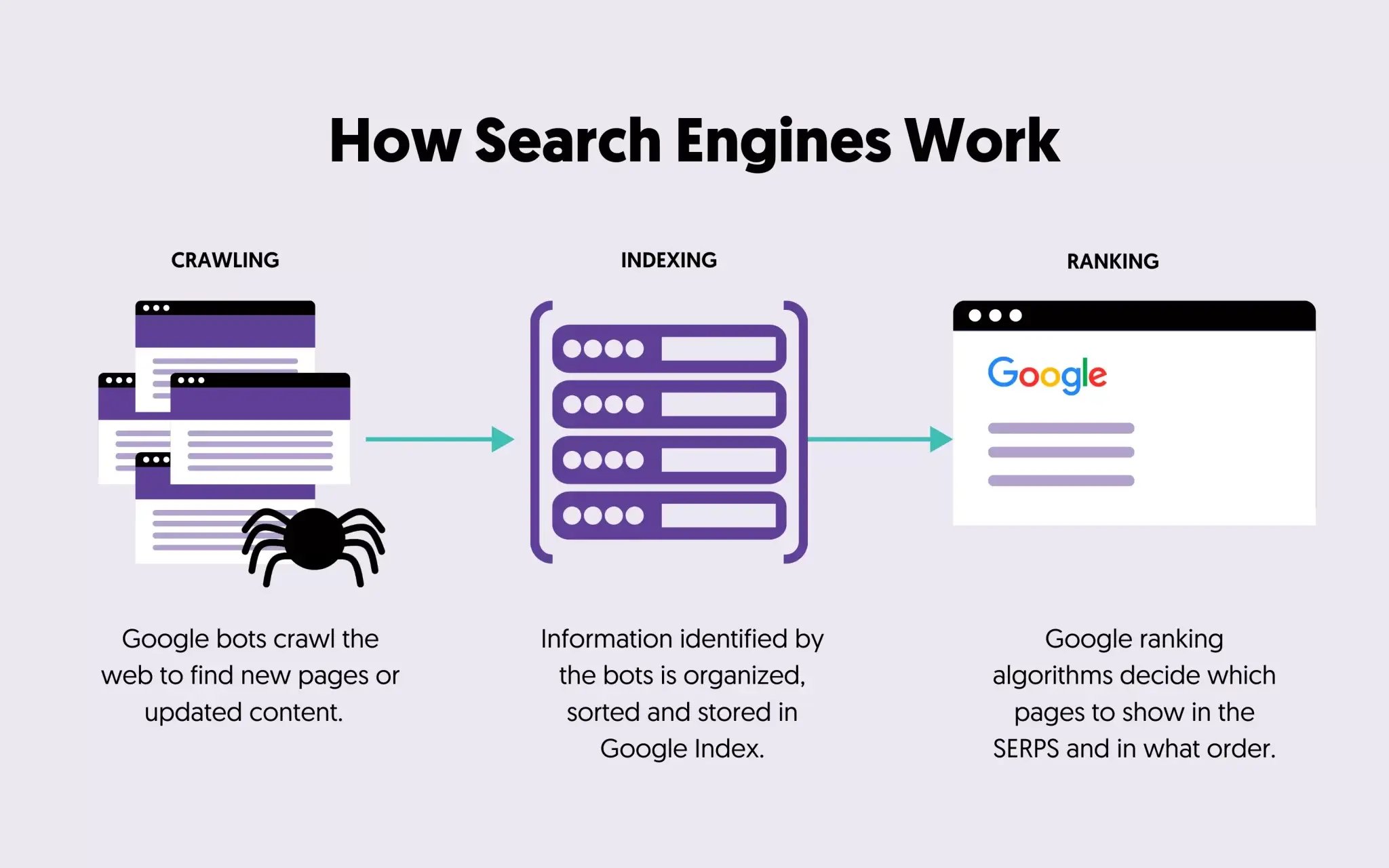
Standard search engine bots follow a two-stage process: an initial crawl of the HTML and a subsequent rendering of the JavaScript.
For many SaaS sites, most of the page content is generated dynamically by JavaScript after load, so it’s only visible at that second stage. If your rendering takes too long or hits a script error, Google indexes an empty page.
**Audit Process:**
- Open [Google Search Console’s (GSC) “URL Inspection” tool](https://support.google.com/webmasters/answer/9012289?hl=en#:~:text=The%20URL%20Inspection%20tool%20provides,AMP%2C%20and%20indexing%2Findexability.)
- Enter your homepage or a key product page
- Click “View Crawled Page” → “HTML”
- Check if your headlines, product copy, and CTAs appear in the raw HTML
If you see mostly empty divs, loading scripts, or skeleton screens, Google can’t index your content.
**The Fix:**
Either switch to **Server-Side Rendering (SSR)** or **Static Site Generation (SSG)**:
- **SSR:** Server sends fully-rendered HTML to both browsers and bots (Next.js, Nuxt.js, Angular Universal)
- **SSG:** Pages are pre-built as static HTML, so they load instantly and are easy for search engines to crawl (ideal for marketing pages, blogs, docs)
B. Indexation Health
It’s not enough to just publish content; you need to ensure Google is actually adding it to their index.
**Here’s how to check:**
- Open Google Search Console → Pages
- Review the “Why pages aren’t indexed” section
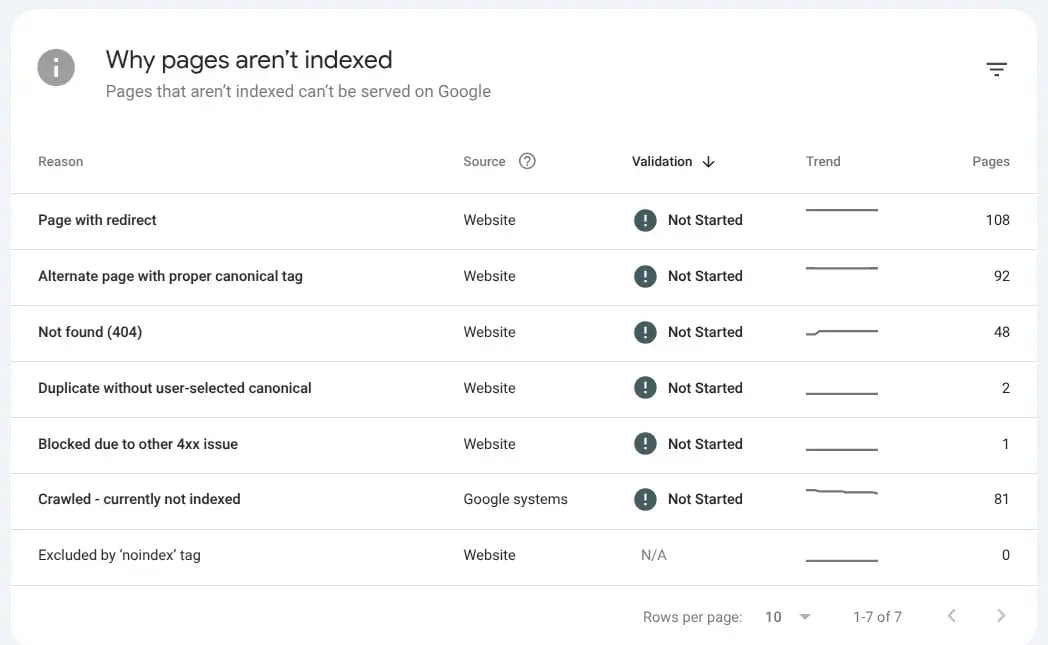
- Look for patterns in the excluded pages
**Common issues you’ll find:**
| Issue | What It Means | How to Fix |
| --- | --- | --- |
| **404 Errors** | Broken links to pages that no longer exist | Restore the content, implement proper 301 redirects to relevant pages, or remove internal links pointing to these URLs |
| **Crawled - Currently Not Indexed** | Google found these pages but decided not to index them (usually due to thin content or low quality) | [Improve content quality](https://www.seo-growup.com/blog/b2b-saas-content-audit-guide), add clearer value propositions, or strengthen internal linking from high-authority pages |
| **Pages with Redirects** | These redirect to other URLs, so Google indexes the destination instead | Audit redirect chains and update internal links to point directly to final destinations |
| **Duplicate Content** | Multiple URLs with similar content competing against each other | Use canonical tags to tell Google which version to index, or consolidate content into single authoritative pages |
| **Noindex Tags** | Pages explicitly blocked from indexing | Remove noindex tags from pages that should be indexed, or verify intentional exclusions (e.g., admin pages, thank you pages) |
C. Crawl Budget Management
For most smaller SaaS sites, crawl budget isn’t a major issue, Google is usually quick to find and index everything that matters.
But at [enterprise scale](https://www.seo-growup.com/enterprise-b2b-saas-seo-agency), when your site includes thousands of marketing, documentation, and support pages, it’s worth keeping an eye on how efficiently search engines are spending their crawl time.
**Audit Process:**
- Open Google Search Console → Settings → Crawl Stats
- Look at “Crawl requests per day” and which URLs are being crawled most
- Check if Google is spending significant time on pages that shouldn’t be indexed
**Red flags:**
- High crawl activity on /search?q= or filter URLs
- Session IDs or tracking parameters getting crawled repeatedly
- Admin or staging environments appearing in crawl logs
**The Fix:** [Refine your robots.txt](https://www.semrush.com/blog/beginners-guide-robots-txt/) to prioritise key commercial pages and block low-value paths like admin sections, internal searches, and session parameters.
### Phase 2: Page Speed and Core Web Vitals
Performance is part of your go-to-market infrastructure.
If core pages load slowly, acquisition efficiency drops before your product or positioning ever gets evaluated.
Understanding Core Web Vitals
Google measures user experience through three metrics that correlate strongly with bounce rates and conversions.
**How to check your scores:** Open [Google PageSpeed Insights](https://pagespeed.web.dev/), enter your homepage URL, and look at the Core Web Vitals section in the results.
| Metric | What It Measures | Target | How to Optimise |
| --- | --- | --- | --- |
| **Largest Contentful Paint (LCP)** | How long until the main content loads | Under 2.5 seconds | - Compress images to under 200KB and use WebP format - Use a CDN for faster delivery - Eliminate render-blocking scripts - Lazy load below-the-fold images |
| **Cumulative Layout Shift (CLS)** | How much the page jumps around while loading | Under 0.1 | - Set width and height attributes on all images and videos - Reserve space for ads and dynamic content - Use font-display: swap for web fonts |
| **Interaction to Next Paint (INP)** | How quickly the page responds to clicks and taps | Under 200ms | - Break up long JavaScript tasks into smaller chunks - Defer non-critical third-party scripts - Optimise event handlers and click responses |
### Phase 3: Site Architecture and Internal Linking
Your site’s architecture determines how search engines and users navigate your product. For SaaS sites, a clean structure ensures authority flows from your homepage to individual feature pages.
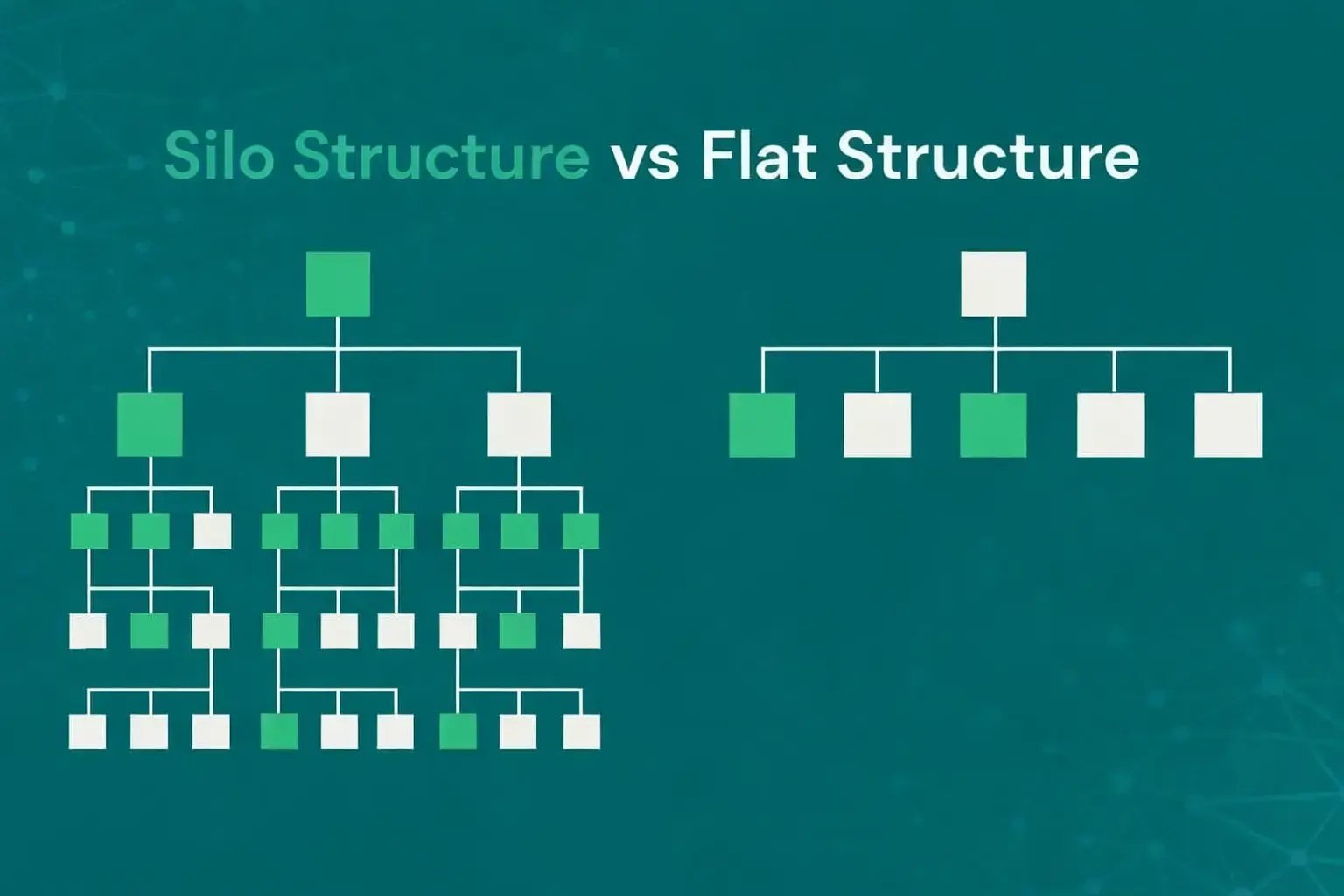
With a flat structure, link authority reaches your commercial pages directly instead of getting diluted through multiple layers.
A. Navigation and Menu Structure
Your main navigation is the most powerful internal linking tool you have. Every page linked from your header menu gets crawled frequently and receives a strong authority signal.
**Audit Process:**
Look at your main nav. Are your most commercially important pages included?
- Pricing
- Key product features or use cases
- Customer stories/case studies
- Free trial or demo signup
Compare this to what’s actually there. Many SaaS sites bury their pricing under dropdown menus or leave case studies completely out of the main nav.
**Fix:**
Restructure your menu to prioritise conversion-focused pages. Think commercially: which pages directly lead to signups or demos? Those should be front and center in your navigation.
**Example structure:**
**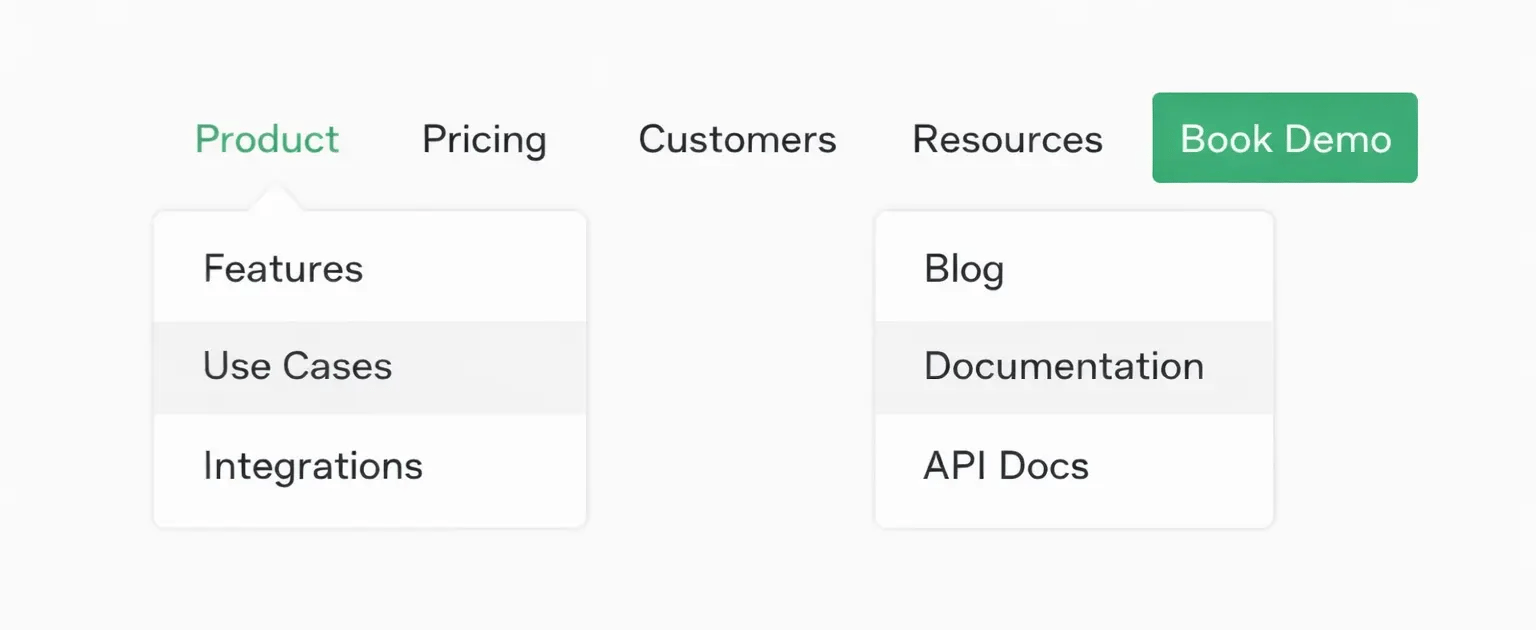**
**What this structure does:**
- Pricing and Customers are top-level items (not buried in dropdowns)
- Product dropdown exposes your most valuable feature pages to search engines
- Resources are grouped to avoid cluttering the main nav
- Book Demo gets prime real estate as a standalone CTA
**The key:** every top-level menu item should either drive conversions or distribute authority to pages that do.
B. Subfolders vs. Subdomains
A recurring debate in SaaS is whether to host a blog or documentation on a subdomain (`blog.product.com`) or a subfolder (`product.com/blog`).
- In almost every instance, subfolders perform better. Search engines treat subdomains as distinct entities. By using a subfolder, [every backlink earned](https://www.seo-growup.com/blog/link-building-audit-for-b2b-saas) by your content directly increases the authority of your core product pages.
- **The Fix:** If you’re on subdomains, plan a migration to subfolders with 301 redirects. This consolidates all your link authority under one domain.
**Important:** this is a technical migration that requires careful planning to avoid losing rankings temporarily.
C. Internal Link Distribution
Internal links are one of the clearest ways to show Google what matters on your site. If your pricing page has 5 internal links while a legacy blog post from 2019 has 50, you’re sending a very different priority signal than you intend.
**Audit Process:**
Use a crawling tool (Screaming Frog, Sitebulb, or Ahrefs Site Audit) to identify:
- Pages with zero internal links pointing to them (orphan pages)
- How many internal links your key commercial pages receive
- Which pages receive the most internal links
**Look for mismatches:** do your conversion pages have fewer internal links than old blog posts?.
**How to Rebalance:**
- Link to pricing, features, and case studies from your most-trafficked posts
- Add contextual links within blog content (e.g., “learn how \[Feature\] works” linking to product pages)
- Include relevant product pages in your blog sidebar or footer
- Make sure every new piece of content links to at least one commercial page
**Target:** Your highest-converting pages should have the most internal links and be no more than 2-3 clicks from your homepage.
### Phase 4: Mobile-First Indexing & Responsive Design
Google [prioritises the mobile version](https://developers.google.com/search/docs/crawling-indexing/mobile/mobile-sites-mobile-first-indexing) of your site for indexing and ranking. If your mobile experience has critical issues, your rankings will suffer even if your desktop site is flawless.
**Check your mobile experience:**
Open [Google Search Console](https://search.google.com/search-console) → Core Web Vitals → Mobile Tab to see reported issues. Then test key pages on your actual phone.
| Issue | Why It Matters | How to Fix |
| --- | --- | --- |
| **Text Too Small to Read** | Users have to pinch and zoom to read content, creating friction | - Set minimum font size to 16px for core body text - Use scalable relative units (rem, em) instead of fixed pixels - Test real-world readability on actual mobile devices |
| **Hard-to-Tap Interactive Elements** | Buttons and links are difficult to tap accurately, causing user frustration | - Make buttons minimum 44x44 pixels - Space interactive elements at least 8-10px apart - Make primary CTAs full-width on mobile for easier tapping |
| **Content Wider Than Screen** | Users have to scroll horizontally to see content, breaking the reading flow | - Use responsive layouts with CSS Flexbox or Grid - Set max-width: 100% on images, videos, and tables - Convert wide tables to stacked cards on mobile screens |
| **Intrusive Popups** | Modals that cover content and can’t be easily dismissed hurt user experience | - Delay popups until after user engagement (scroll, 30+ seconds) - Make close buttons large and obvious - Use bottom banners instead of full-screen overlays |
### Phase 5: Structured Data & Schema Markup
Structured data helps search engines understand your product: what it does, how much it costs, who it’s for. Done right, this gets you richer search results with ratings, pricing, and key features showing up before users even click.
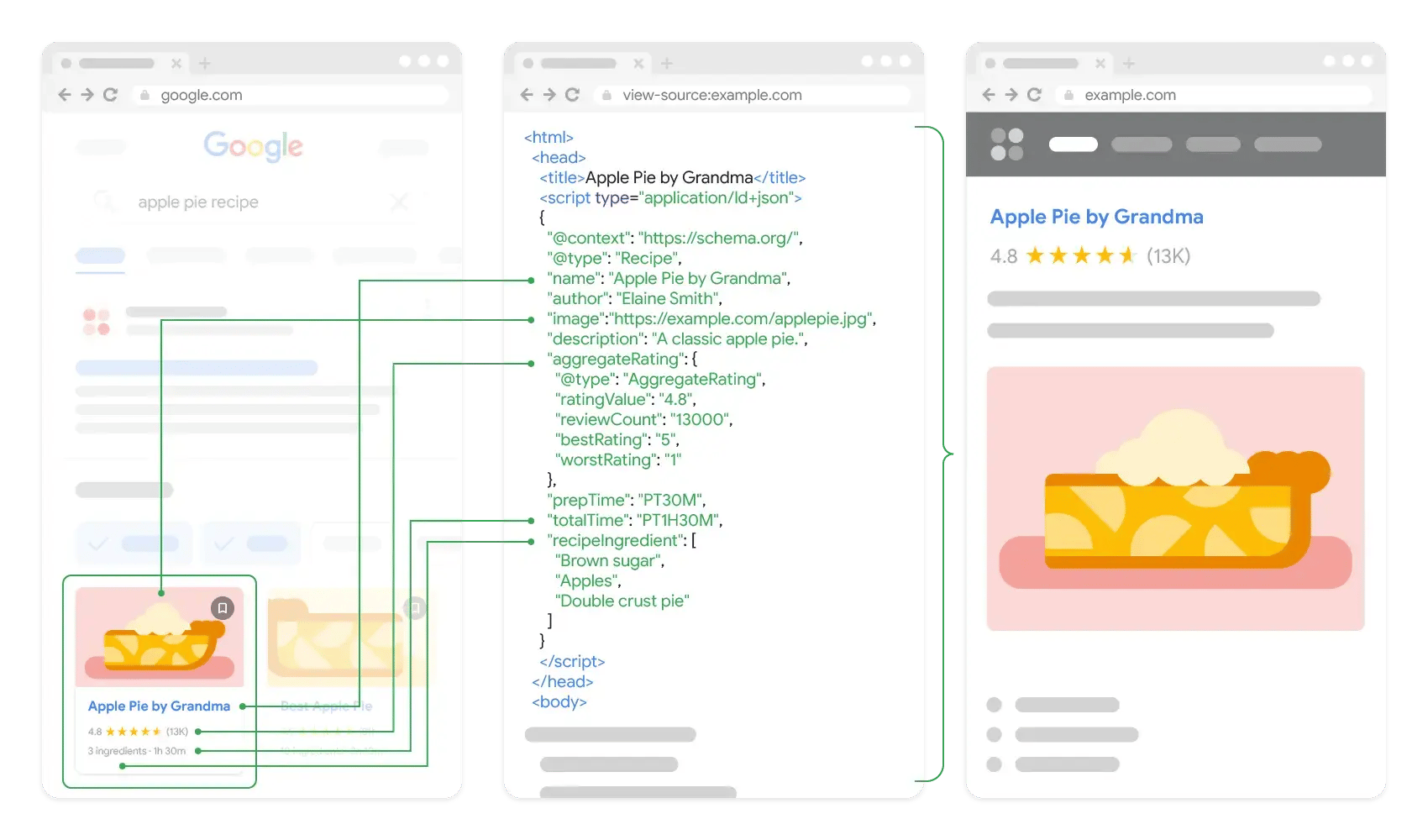
Example of how structured data enhances search result displays
**How to check your current schema:** Use Google’s [Rich Results Test](https://search.google.com/test/rich-results) to see what structured data is already on your pages.
| Schema Type | Where to Use It | What to Include |
| --- | --- | --- |
| **Software Application** | Product pages, homepage | - Product name and description - Operating system (web, iOS, Android) - Application category - Aggregate rating (if you have reviews) |
| **Offer (Pricing)** | Pricing page | - Price and currency for each plan - Billing frequency (monthly/annual) - Plan name and description - Link to signup page |
| **FAQPage** | FAQ sections, support articles | - Each question as a separate entry - Complete answer for each question - Can trigger FAQ rich snippets in search results |
| **HowTo** | Tutorials, onboarding guides | - Step-by-step instructions - Time required for each step - Images or tools needed |
| **Article** | Blog posts, case studies | - Headline and author - Publication and modification dates - Featured image |
Implementation Approach
- **Start with high-impact pages:** Add SoftwareApplication schema to your homepage and main product pages first. Then add Offer schema to your pricing page. These two will have the biggest impact on how your product appears in search.
- **Automate through templates:** Build schema into your CMS templates so it automatically applies to new content.
- **Validate your markup:** Use Google’s Rich Results Test after implementation to check for errors. Fix any missing required fields or formatting issues.
If you need a second set of eyes on this or want help prioritising fixes by revenue impact, get in touch.
[Schedule a Consultation](https://www.seo-growup.com/get-in-touch)
## Building the Business Case: How to Secure Buy-In for Technical SEO
Once the audit is complete and the fixes are clear, here’s how to get dev resources allocated without being deprioritised against product features.
Week 1: Build the Business Case
**Document the revenue impact** (2 hours):
Use Google Search Console and Google Analytics to pull:
- Total product pages vs. indexed product pages (Index Coverage report)
- Queries your pages SHOULD rank for but don’t (Search Performance report)
- Current conversion rate on indexed pages (GA goals)
- Page load times on key conversion pages (GSC Core Web Vitals)
**Calculate lost revenue:**
`Unindexed pages × Average search volume × Industry conversion rate × Your trial value = Monthly opportunity cost`
**Example:** 185 unindexed product pages × 50 avg monthly searches × 3.8% conversion × $1,800 trial value = $63,270 monthly opportunity.
**Create one-pager for executive team** (1 hour):
- **Current state:** “X% of our product pages aren’t indexed, costing approximately $Y monthly in lost trials”
- **Specific fixes needed:** “Server-side rendering for product templates, Core Web Vitals optimisation, canonical implementation”
- **Resource request:** “Z weeks of dev time over next quarter”
- **Expected outcome:** “Projected increase of W trials monthly based on indexation improvement”
Week 2: Developer Briefing
**Create specific, measurable tickets** (2 hours):
**❌ Don’t say:** “Our site is slow and it’s hurting conversions”
✅ **Say:** “LCP is 4.2s on pricing and homepage (target: \< 2.5s). Main bottlenecks: unoptimised hero images (800KB+), render-blocking third-party scripts, and large JS bundles.
**Recommended fixes:** implement code-splitting on main bundle, lazy-load below-fold images, defer non-critical scripts (Intercom, analytics).
**Success criteria:** LCP \< 2.5s, INP \< 200ms on /pricing, /features, and homepage.”
**Template for each critical issue**:
`ISSUE: [Specific technical problem] EVIDENCE: [GSC screenshot + data] BUSINESS IMPACT: [Lost trials/revenue] REQUESTED FIX: [Specific solution] ACCEPTANCE CRITERIA: [Measurable outcome] TIMELINE: [Realistic dev estimate]`
**Allocate dedicated sprint capacity** (1 hour):
Request 15-20% of next sprint for technical SEO. Frame it as revenue generation, not marketing optimisation.
Some teams dedicate one developer 2 days per sprint. Others run quarterly “technical excellence” sprints focused entirely on performance and SEO.
Week 3: Set Up Monitoring
**Configure tracking dashboards** (2 hours):
Create Looker Studio dashboard showing:
- Indexed pages by section (from GSC)
- Core Web Vitals trends (from GSC)
- Organic trials by page type (from GA)
- Crawl budget efficiency: pages crawled / pages in sitemap (from GSC)
**Share weekly in product review meetings**. When developers see JavaScript optimisations move metrics, they engage.
**Establish baseline metrics** (1 hour):
Before any fixes:
- Index coverage %
- Avg LCP/INP on conversion pages
- Organic conversion rate
- Trials from organic by page category
**After fixes (6-8 weeks later):** Track the same metrics. Calculate ROI of dev time/resources invested.
**Recommended Reading:** [How to Calculate ROI for SaaS SEO](https://www.seo-growup.com/blog/measuring-saas-seo-roi)
## Technical SEO is Revenue Strategy
For most SaaS teams, technical SEO starts as a checklist and ends as firefighting.
But when you zoom out, it’s really part of a larger growth system. If you want the broader strategic context, this [complete SaaS SEO audit guide](https://www.seo-growup.com/b2b-saas-seo-audit-guide) breaks down how tech, content, and commercial SEO audits fit together across the SaaS funnel.
And if you ever want a second set of eyes on your technical SEO or help prioritising what to fix first, you can always [reach out to us](https://www.seo-growup.com/get-in-touch). We’ll help you identify the biggest revenue risks and map out a workable action plan.

Author
Muiz Thomas [in](https://www.linkedin.com/in/muiz-thomas-seo/)
Founder & CMO, GrowUp
Muiz leads GrowUp, a B2B SaaS search marketing agency focused on revenue growth. He’s helped clients generate £5M+ in qualified pipeline across construction tech, AI platforms, and enterprise software. Data-obsessive, perpetually overcaffeinated, and holds sales teams more accountable than their own leadership.
The Marketing Brief
by GrowUp
Get monthly GTM strategies, campaign breakdowns, and category trends we’re seeing across high-growth B2B SaaS teams.
Which best describes you? Founder / CEO CMO / VP Marketing Head of Growth / Demand Gen Fractional CMO / Consultant Investor / Board Member
SUBSCRIBE TO THE BRIEF →
### Is your SEO investment actually connected to pipeline growth?
Find out exactly which parts of your funnel SEO is supporting, and which gaps are stalling demos and trials.
[REQUEST YOUR AUDIT →](https://www.seo-growup.com/seo-audit-for-b2b-saas-companies)
Share This Post

We help B2B SaaS teams turn search into a proven revenue channel through GTM-aligned SEO and content.
Get in Touch
The Marketing Brief
by GrowUp
Monthly GTM insights we use to drive SQLs and scale MRR for high-growth B2B SaaS companies.
Email\*
Which best describes you Founder / CEO CMO / VP Marketing Head of Growth / Demand Gen Fractional CMO / Consultant Investor / Board Member
SUBSCRIBE TO THE BRIEF →
### Services
- [B2B SaaS SEO Consulting](https://www.seo-growup.com/seo-consultancy-for-b2b-saas-companies)
- [B2B SaaS Content Marketing](https://www.seo-growup.com/b2b-saas-content-marketing-agency)
- [B2B SaaS SEO Audit](https://www.seo-growup.com/seo-audit-for-b2b-saas-companies)
- [GTM Advisory](https://www.seo-growup.com/go-to-market-advisory-for-b2b-saas)
- [SEO for Startups](https://www.seo-growup.com/b2b-saas-startup-seo-agency)
- [SEO for Scale-Ups](https://www.seo-growup.com/seo-agency-for-b2b-saas-scaleups)
- [SEO for Enterprises](https://www.seo-growup.com/enterprise-b2b-saas-seo-agency)
### Legal
- [Privacy Policy](https://www.seo-growup.com/privacy-policy)
- [Terms & Conditions](https://www.seo-growup.com/terms-and-conditions)
### Resources
- [SEO Partner Hub](https://www.seo-growup.com/choosing-a-b2b-saas-seo-partner)
- [Blog](https://www.seo-growup.com/growup-blog)
- [eBooks & Templates](https://www.seo-growup.com/ebooks-and-templates)
- [GTM Prompt Library](https://www.seo-growup.com/gtm-prompt-library)
- [Past Newsletters](https://www.seo-growup.com/newsletter)
### Company
- [Why GrowUp](https://www.seo-growup.com/why-growup)
- [Success Stories](https://www.seo-growup.com/success-stories)
- [Pricing](https://www.seo-growup.com/b2b-saas-marketing-services-and-pricing)
- [Contact Us](https://www.seo-growup.com/get-in-touch)
×

## Is Your SaaS Invisible in ChatGPT, Perplexity and Other LLMs?
Get a comprehensive AEO & AI Search Audit to see where you rank across LLMs and how to capture AI search traffic.
[VIEW SAMPLE REPORT](https://www.seo-growup.com/blog/ai-search-visibility-audit-sample) [REQUEST AN AUDIT](https://www.seo-growup.com/get-in-touch)
★★★★★
“Hands down the most actionable insights we’ve received.”

Savas Vedova
Founder, Stormkit
[](https://www.seo-growup.com)
Services
Core Services
[**LLM SEO** Get cited in ChatGPT, Perplexity and Google AI answers. →](https://www.seo-growup.com/llm-seo-agency-for-b2b-saas-companies) [**Web Design** High-converting websites for complex B2B products. →](https://www.seo-growup.com/b2b-saas-web-design-agency) [**$4.7M** Content-influenced pipeline generated *Read case study →*](https://www.seo-growup.com/blog/ai-pm-platform-case-study)
More Services
[SEO Audit](https://www.seo-growup.com/seo-audit-for-b2b-saas-companies) [SEO Consultancy](https://www.seo-growup.com/seo-consultancy-for-b2b-saas-companies) [Fractional SEO](https://www.seo-growup.com/fractional-seo-consultancy-for-b2b-saas-companies) [Content Marketing](https://www.seo-growup.com/b2b-saas-content-marketing-agency) [Web Copywriting](https://www.seo-growup.com/b2b-saas-copywriting-agency) [SEO Link Building](https://www.seo-growup.com/b2b-saas-link-building-agency) [All services →](https://www.seo-growup.com/b2b-saas-seo-services)
By Stage
[Startups](https://www.seo-growup.com/b2b-saas-startup-seo-agency) [Scale-Ups](https://www.seo-growup.com/seo-agency-for-b2b-saas-scaleups) [Enterprises](https://www.seo-growup.com/enterprise-b2b-saas-seo-agency)
By Sector
[FinTech](https://www.seo-growup.com/fintech-seo-agency) [HR Tech](https://www.seo-growup.com/seo-agency-for-hr-tech) [EdTech](https://www.seo-growup.com/seo-agency-for-ed-tech) [ConTech](https://www.seo-growup.com/construction-tech-seo-agency)
Strategy / Content / Tech / Growth
### More visibility. More pipeline.
We combine strategy, UX, design and development to create websites that support demand generation, sales and brand growth.
[Explore our approach](https://www.seo-growup.com/why-growup)
Our Work
[Portfolio](https://www.seo-growup.com/web-design-portfolio) [Success Stories](https://www.seo-growup.com/success-stories)
[Pricing](https://www.seo-growup.com/pricing)
[Why GrowUp?](https://www.seo-growup.com/why-growup)
Resources
[Blog](https://www.seo-growup.com/growup-blog)
Hub
[Vetting SEO Partners](https://www.seo-growup.com/choosing-a-b2b-saas-seo-partner) [Audit Engagements](https://www.seo-growup.com/b2b-saas-seo-audit-guide)
[eBooks & Templates](https://www.seo-growup.com/ebooks-and-templates) [GTM Prompt Library](https://www.seo-growup.com/gtm-prompt-library) [Past Newsletters](https://www.seo-growup.com/newsletter) [Glossary](https://www.seo-growup.com/glossary)
[Get In Touch](https://www.seo-growup.com/get-in-touch)
```json
{
"@context" : "https://schema.org",
"@type" : "BlogPosting",
"author" : {
"@type" : "Person",
"name" : "Muiz Thomas",
"url" : "https://www.seo-growup.com/blog/author/muiz-thomas"
},
"dateModified" : "2026-03-02T12:01:31.297Z",
"datePublished" : "2026-02-13T17:33:06.000Z",
"headline" : "Technical SEO Audit Framework for SaaS Products (Complete Guide)",
"image" : [ "https://www.seo-growup.com/hubfs/Technical%20SEO%20Audit%20for%20SaaS%20Growth.webp" ],
"mainEntityOfPage" : {
"@id" : "https://www.seo-growup.com/blog/technical-seo-audit-for-saas",
"@type" : "WebPage"
},
"publisher" : {
"@type" : "Organization",
"logo" : {
"@type" : "ImageObject"
},
"name" : "GrowUp"
}
}
```
```json
{
"@context" : "https://schema.org",
"@type" : "ProfessionalService",
"address" : {
"@type" : "PostalAddress",
"addressCountry" : "GB"
},
"alternateName" : "GrowUp SEO",
"areaServed" : {
"@type" : "Place",
"name" : "United Kingdom"
},
"audience" : {
"@type" : "Audience",
"audienceType" : [ "B2B SaaS Founders", "CMOs", "VPs of Marketing", "In-House Marketing Teams" ]
},
"award" : [ "Most Creative SEO Agency - Martech Awards", "SME News Midlands Enterprise Awards" ],
"description" : "Search marketing agency for B2B SaaS companies. We help teams turn organic and AI search into a fully accountable revenue channel with clear attribution to demos, pipeline, and measurable MRR.",
"email" : "mailto:hello@seo-growup.com",
"founder" : {
"@type" : "Person",
"name" : "Muiz Thomas"
},
"hasOfferCatalog" : {
"@type" : "OfferCatalog",
"itemListElement" : [ ],
"name" : "B2B SaaS Growth Services"
},
"knowsAbout" : [ "B2B SaaS SEO", "Search Engine Optimisation", "Content Marketing", "Go-to-Market Strategy", "SaaS Marketing", "Pipeline Generation", "Revenue Attribution", "AI Search Optimisation" ],
"name" : "GrowUp",
"priceRange" : "£3500+",
"sameAs" : [ "https://www.linkedin.com/company/b2b-saas-seo-agency/", "https://www.instagram.com/seo.growup/" ],
"serviceType" : [ "SEO Consulting", "Content Marketing", "GTM Advisory", "SEO Audit" ],
"slogan" : "Organic & AI Search Programs Built to Deliver SQLs, Pipeline and Measurable MRR",
"url" : "https://www.seo-growup.com/"
}
```